


Go to Windows platform Display platforms icon
Go to Windows platform Go to Mac platform Go to Android platform Go to iOS platform
Ideal Photo Sorter icon

Ideal Photo Sorter

4.37
0 0 reviews
1.8 k downloads
security security

Automatically organize all your photos

Advertisement
Remove ads and more with Turbo
Advertisement
Remove ads and more with Turbo
Andrés López icon
Reviewed by
Andrés López
Content Editor
Andrés López is part of Uptodown's in-house Editorial Team. Translated by Uptodown Localization Team

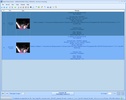
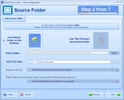
Ideal Photo Sorter is a tool to organize all the photos and images on your hard drive, even if they're inside zipped files or subfolders.

The program supports more than 300 different image formats, among them, of course, the classics: JPG, BMP, PSD, PDF, PNG, GIF, ICO, TIFF, or BTF.

Advertisement
Remove ads and more with Turbo

Besides organizing and cataloging your images according to your criteria, Ideal Photo Sorter shows info about each photo individually, including its size, dimensions, type of color, or filepath.

Ideal Photo Sorter is an interesting application for people with lots of photos on their hard drive, which can turn into a difficult issue to manage at times.

Information about Ideal Photo Sorter 4.37

Basic information

Developer IdealSorter
Category Image Tools
Rating All ages
Languages English

Distribution model

Pricing Trial
License Proprietary
Copyright © 2026 IdealSorter
Why is this app published on Uptodown? (More information)

Security and privacy

Required permissions Not applicable
See security and antivirus report

Download info

Downloads 1,750
Date Jan 24, 2011
File type EXE
Size 19.76 MB
SHA256 395a7fba0f0831962c37d19ffd7c51c4c418ea2d98491894ecb17b4eb3c6c4b5
Advertisement
Remove ads and more with Turbo

Rate this App

Review the app
Ideal Photo Sorter icon

Comments

There are no opinions about Ideal Photo Sorter yet. Be the first! Comment

Advertisement
Remove ads and more with Turbo
ibis Paint icon
Unleash your imagination in this drawing app
Android Screen Unlock(4uKey) icon
Remove screen lock passwords from Android devices
HEIF Image Extensions icon
Official extension for opening files in HEIF format in Windows
Paint icon
The Windows drawing tool
Xender - Share Music Transfer icon
Send files between devices and download content
Inkscape icon
Open source vector graphics editor
Windows Scan icon
Conveniently digitize your documents and photographs
Figma icon
Limitless design, collaboration, and creation
AutoCAD icon
Create, edit, and automate 2D and 3D designs professionally
CorelDRAW icon
One of the best options for graphic design
Adobe Illustrator icon
Create logos, illustrations, and designs with this powerful editor
DaVinci Resolve icon
The most powerful and complete post-production video tool for PC
Adobe Photoshop icon
Professional photo editing from Adobe
Microsoft Photos icon
View your photos on Windows
Picasa icon
Organize and view all your pictures easily
Adobe Lightroom icon
Edit your digital pictures with this elegant tool